








Marmot Build· Marmot-Apps
For real-estate agents · And the designers who help them sell

From vacant room
to listed in 60 seconds.

One LiDAR scan on iPad. The designer stages it three ways with AI. The agent opens the same project — the staged photo is already inside the Listing Package, the MLS bundle, and the virtual tour. Hutch + BoxBrownie + Stessa + your MLS portal are four apps. Marmot Build is one.

iPad-native AI staging in 60s MLS-ready export Spring 2026
Marmot Build — live LiDAR 3D room scan on iPhone
Marmot Build · Listing Studio Scan → Stage → Listed

The iPad app real-estate agents use to turn an empty room into a listing — and the same app interior designers use to stage it. One LiDAR scan. Three AI-staged variants in 60 seconds. MLS bundle in one tap.

Building · Spring 2026
The foundation under everything

One scan.
A measurable room, ready to stage.

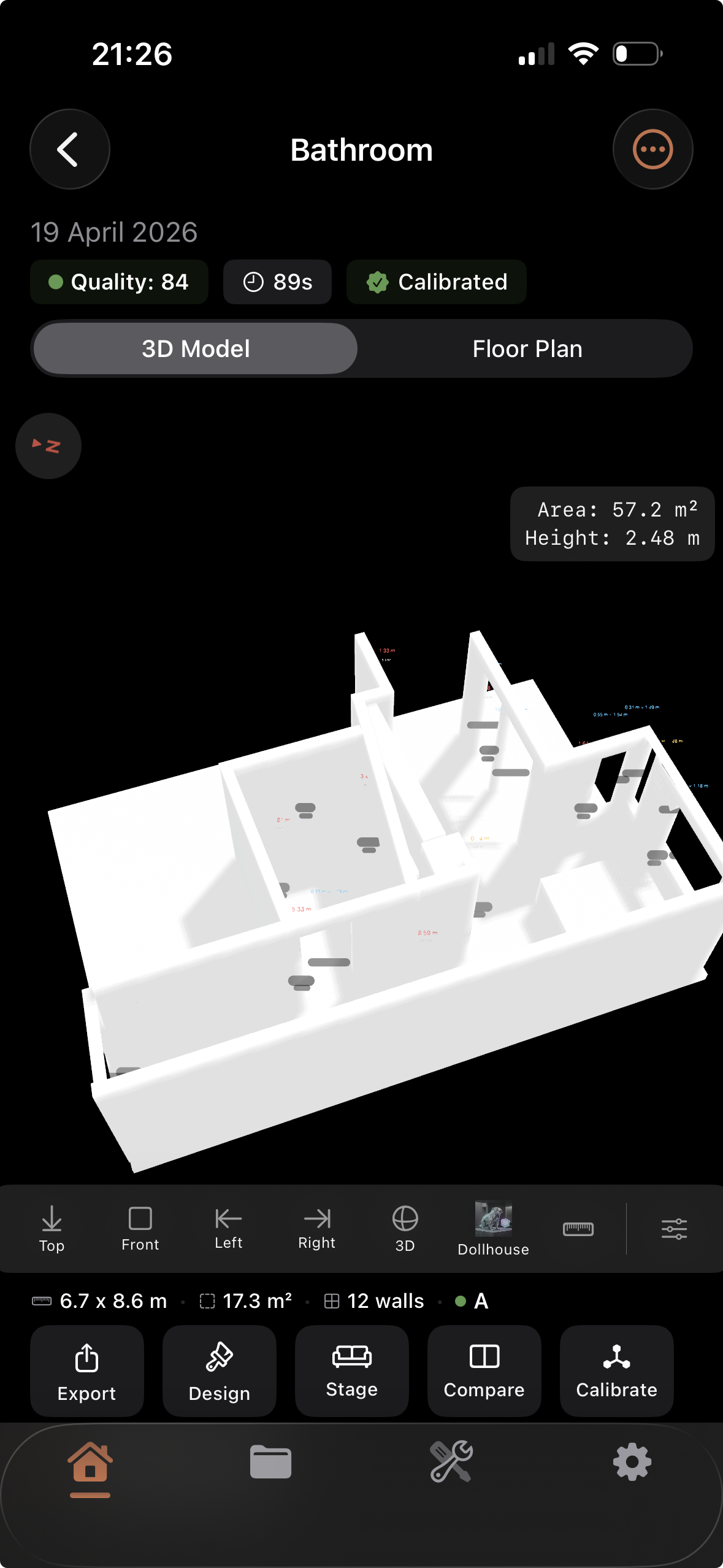
Before the staging, the listing, and the MLS export — there's the scan. Marmot Build uses the LiDAR sensor in iPhone or iPad to reconstruct the room in under a minute. Survey-grade 3D model and a clean 2D floor plan, both labeled, both measurable. Every downstream feature is built on top.

The screenshots below come from the in-development alpha build — a teaser of what's coming. Scan accuracy, mesh refinement, and visual polish will improve significantly before public release.

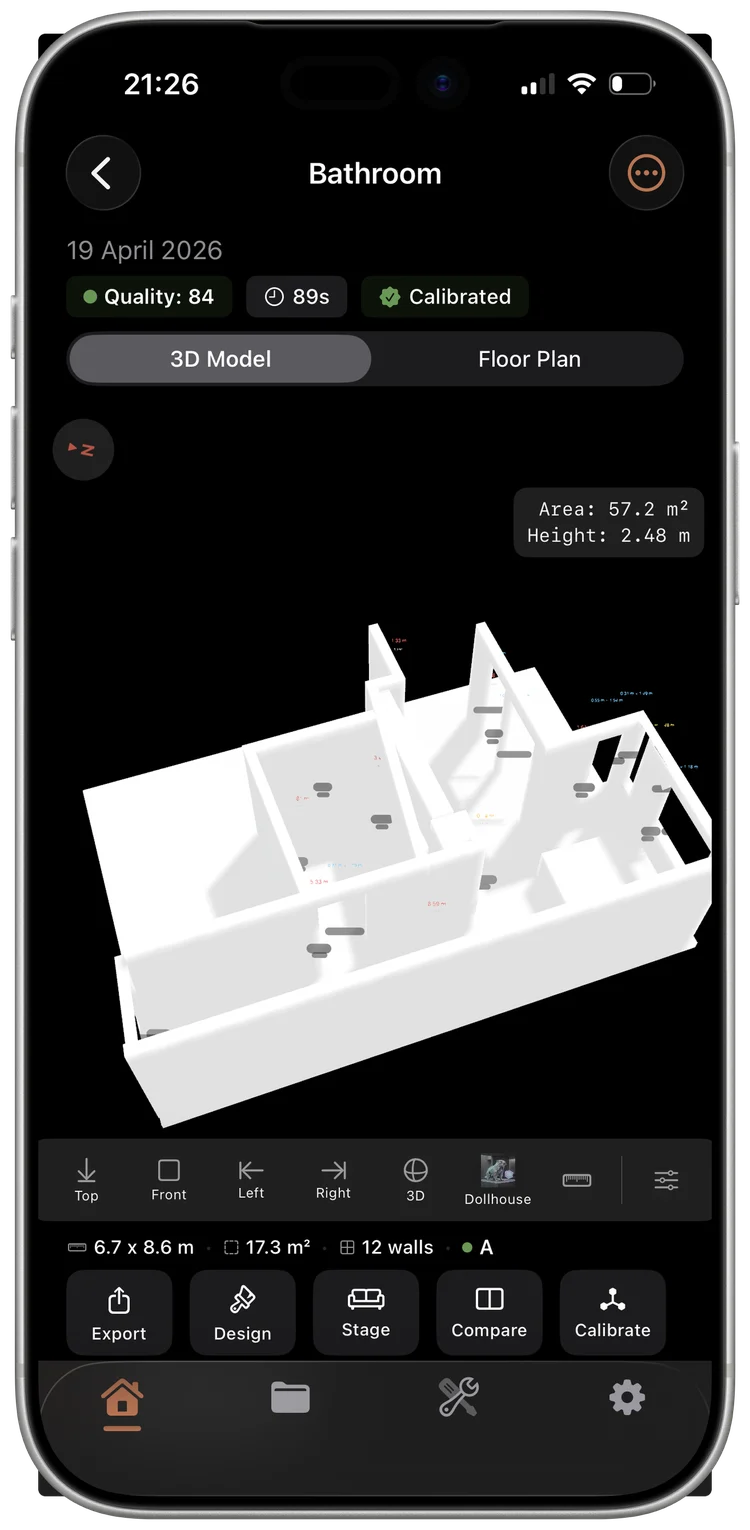
Marmot Build — 3D LiDAR scan of a room captured on iPhone
3D Scan

Survey-grade 3D models, on-device.

Apple RoomPlan + AI refinement. Walls, floors, ceilings, doors, windows, and furniture — captured at architectural precision in under a minute.

  • Real-time mesh refinement during capture
  • Furniture detection · 16 categories
  • Sub-centimeter measurement accuracy
  • Exports: USDZ, OBJ, STL, PLY
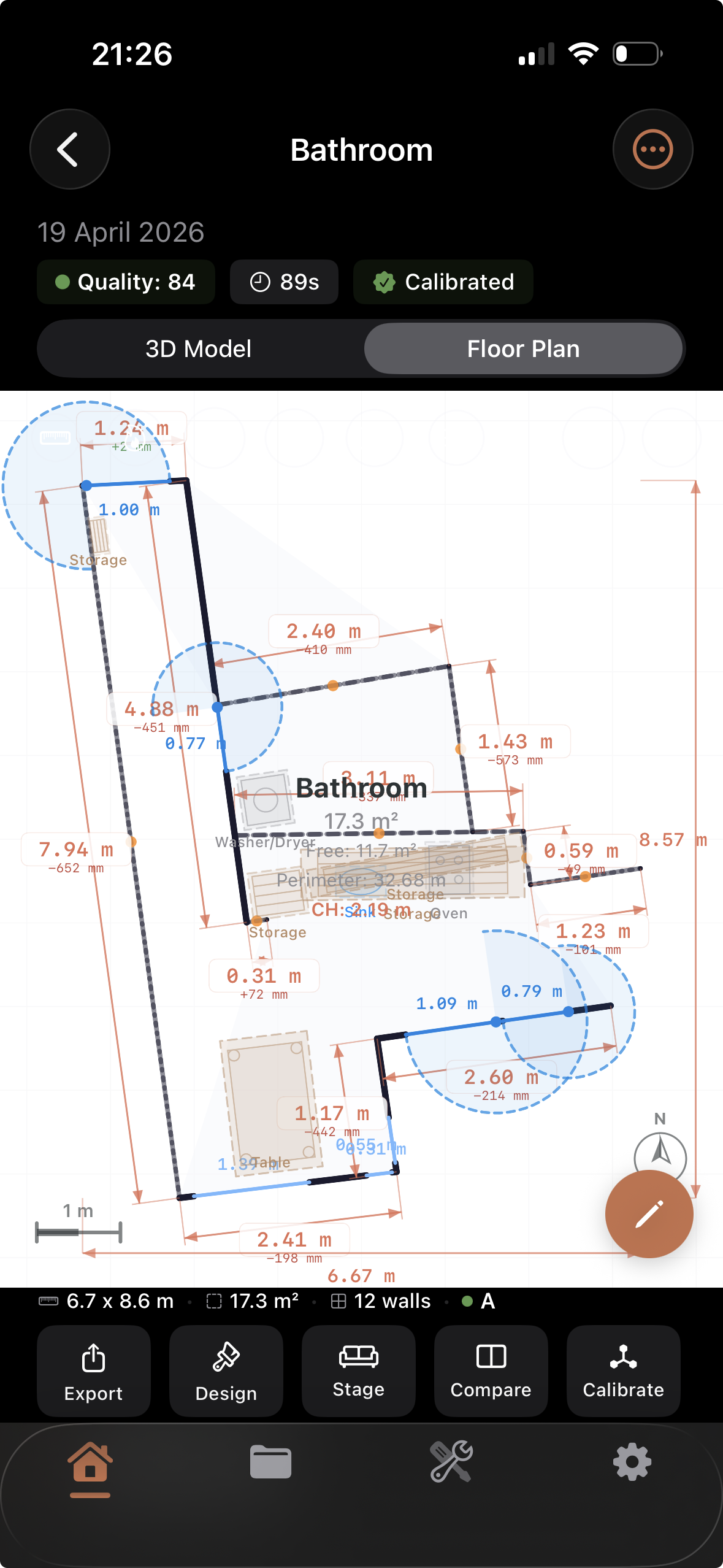
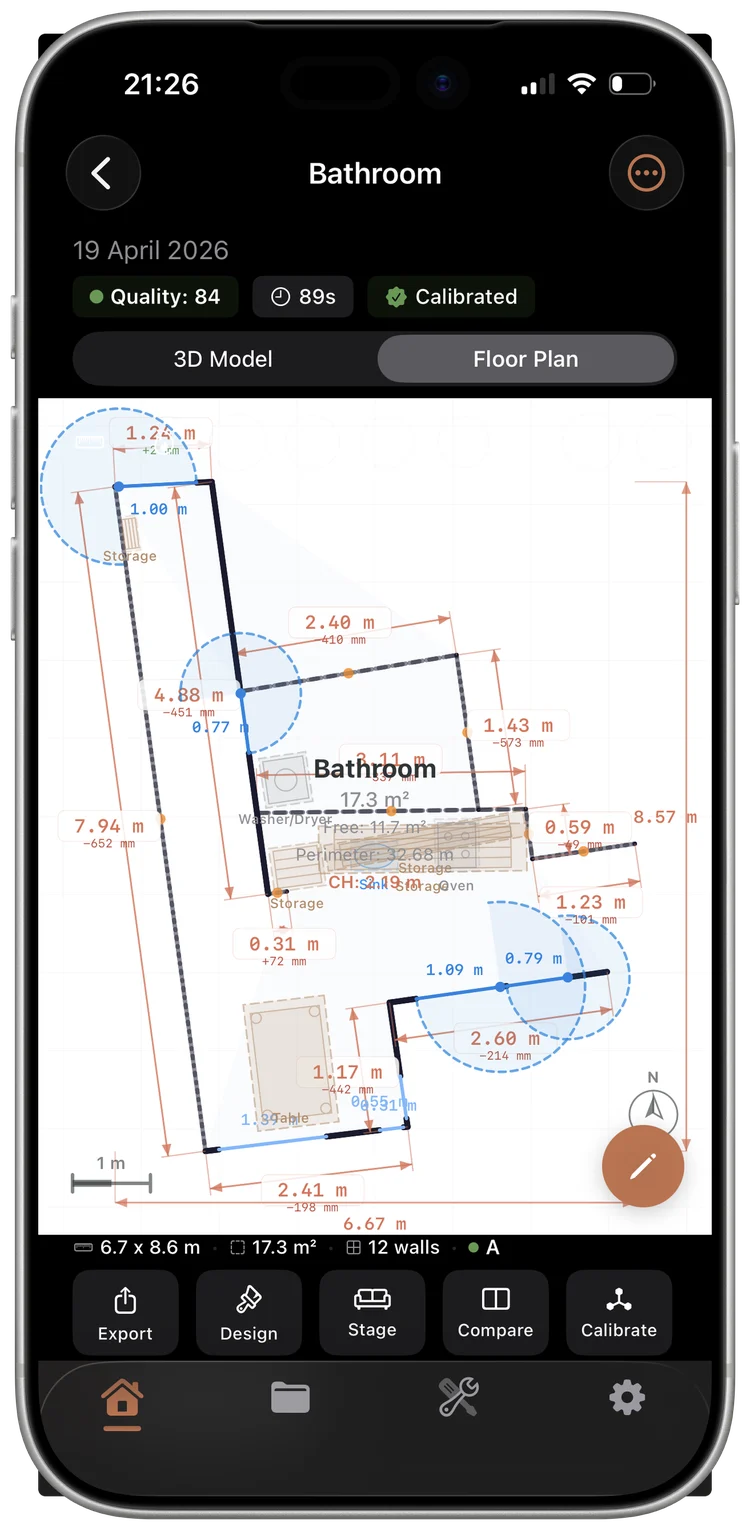
Marmot Build — 2D architectural floor plan generated from a LiDAR scan
2D Floor Plan

Clean floor plans, generated automatically.

Top-down architectural drawings derived from your 3D scan. Walls, doors, windows, and furniture — labeled, measured, and ready for clients.

  • Auto-detected walls, doors, windows
  • Dimensions in m, cm, ft, or in
  • Toggle furniture, fixtures, labels
  • Exports: PDF, SVG, PNG, DXF
The moat · The demo nobody else can ship

One scan. Two products.
Zero re-import.

A designer scans a vacant property, generates three staging variants, picks the one that sells the room. The agent on the same team opens the same project and the staged image is already inside their Listing Package — ready for the MLS bundle, the flyer, and the virtual tour. Hutch, BoxBrownie, Buildxact, and your MLS portal are four apps. Marmot Build is one.

  1. 01 · Designer

    Scan the vacant room.

    Walk in with the iPad. RoomPlan captures walls, doors, windows, and existing furniture in under 60 seconds.

  2. 02 · Designer

    Stage it three ways.

    AI generates three variants — Scandi, mid-century warm, coastal. Each piece of furniture is shoppable. Pick one, save to project.

  3. 03 · The handoff

    Project syncs. No re-import.

    CloudKit hands the project off to the agent. Same scan, same staged photo. Mode switches from Designer to Agent automatically.

  4. 04 · Agent

    Listed before the 11am showing.

    One tap: Listing Flyer PDF, virtual tour URL, MLS-ready bundle. Sent to MLS, posted to the public listing, and queued in the lead pipeline.

For the agent · 60% of the app

Ship a listing
before lunch.

Listing Day lives on the Home tab. Today's showings, fresh leads from yesterday's open house, the MLS bundle from this morning's scan. Built for the morning before the 11am tour — not for the afternoon admin block.

Listing Package

MLS-ready in one tap.

One-page Listing Flyer PDF, photo bundle sized for every major MLS, virtual tour URL — all from one share sheet. No InDesign, no $80/listing flyer service, no waiting on a junior agent.

Kiosk Mode

Open houses that capture leads.

Park an iPad on the kitchen island. Visitors swipe through the gallery, drop their email, and the lead lands in your pipeline before they're back to their car.

Lead Pipeline

Every lead, scored and routed.

From kiosk drops, listing-page submissions, or manual entry. Each lead tagged by listing, channel, and intent. AI proposes the next touch — call, text, or send a one-pager.

Showings & Calendar

Today's tour, up top.

Showing Scheduler pinned to the Home tab. Confirm, reschedule, log the result with a voice memo from the curb. Auto-syncs to Apple Calendar and to the lead's record.

Virtual Tour

A shareable URL, not a Matterport invoice.

The 3D scan becomes a public web tour at marmot-apps.com/tour/{slug}. Walk-through navigation, embedded staging variants, no plugin, no Pano headset, no $200/listing fee.

Valuation & CMA

A defensible price range, in 30 seconds.

Auto-pulled comps, condition score from the scan, and a price range narrative for the seller meeting. PDF export with sources. No subscription to Realtors Property Resource.

For the designer · 40% of the app

Three staged variants.
Sixty seconds. Every piece shoppable.

The AI Studio is built around the staging engine. Same engine that backs the agent's listing package — but with the mood board, the shoppable specs, and the design comparison surface that designers actually want to send to clients.

AI Virtual Staging

Three styles, one minute.

Scandi, mid-century warm, coastal, modern luxe, Japandi — three variants per generation, powered by gpt-image-1 through our private proxy. Generate again until the client says yes.

Shoppable furniture

Every chair, linked and priced.

Each piece of staged furniture is matched to Wayfair, West Elm, and CB2 via the ProductSearchService. The mood board includes the SKU, the price, and a buy link the client can tap.

Mood Board PDF

The mood board that promotes to a listing.

Build the look — fabric swatches, paint chips, furniture chips with prices. Tap "Promote to Listing" and the staged image jumps straight into the agent's Listing Package on the same project.

Room Visualizer

Walk the staged room, before it exists.

The 3D scan + the staged variant rendered as a walkable model. Take the client through the new layout in AR before a single piece of furniture is moved.

Wall Color Picker

Swap the paint, live.

Tap a wall in the staged photo, swatch a new color, see the room repaint instantly. Benjamin Moore and Farrow & Ball palettes built in.

Design Comparison 3D

Before and after, side by side.

Drag the slider across the original room and the staged version, in 3D. The PDF export lays them out as a designer presentation — not a screenshot.

Pricing

One app. Three tiers.
Seven-day free trial on every plan.

Free tier covers three projects and ten staging generations per month — enough to try the full handoff before committing.

Designer Pro

$24/ month

For the studio designer who wants the work to actually show up on Zillow.

  • Unlimited AI staging variants
  • Mood boards with shoppable chips
  • Design comparison 3D + Room Visualizer
  • Promote-to-Listing handoff
Agent ProRecommended

$49/ month

For the agent who wants to ship a listing before the 11am tour.

  • Unlimited listings + MLS export
  • Kiosk Mode for open houses
  • Lead pipeline + showing scheduler
  • Virtual tour publishing
  • Everything in Designer Pro
Team

$79/ month

For the small agency where the designer and the agent are different people.

  • Both Pro tiers, multi-seat
  • Shared workspace + project handoff
  • Cross-persona analytics
  • Priority support
Made for the Apple ecosystem

Native SwiftUI. LiDAR. Apple Pencil. iCloud.

Marmot Build runs on iPhone, iPad, and Mac Catalyst. LiDAR room scanning via Apple's RoomPlan. Apple Pencil for floor plan markup and annotation sketches. iCloud sync via CloudKit — your projects live on every device you sign into. AI staging runs through our private proxy so prompts and photos never train a third-party model. The 3D viewer hits 120Hz on ProMotion displays.

The studio

A Marmot-Apps app.

Marmot Build is part of a small independent iOS studio building AI-powered apps for everyday life. Privacy by default, on-device when possible.

Marmot Vox Voice → Intelligence Marmot Vault Paper → Searchable Hera Body → Wellness Códice Bible · Spanish only
Built for

Four workflows that used to take four apps.

Real-estate listing app for agents

From scan to MLS bundle to virtual tour to one-page flyer — without leaving the room, without four subscriptions.

Virtual staging app for interior designers

Three AI-staged variants in 60 seconds. Each piece of furniture shoppable via Wayfair, West Elm, and CB2.

LiDAR floor plan generator

Apple RoomPlan + AI refinement. Walls, doors, windows, and furniture captured at architectural precision.

Open house lead capture (Kiosk Mode)

Park an iPad on the kitchen island. Visitors swipe through the gallery, drop their email, lead lands in your pipeline.

FAQ

Common questions

Quick answers people search for before deciding to wait for launch.

When is Marmot Build launching?

Spring 2026, on the App Store. Sign up at the top of the page to be notified — you'll get a TestFlight invite when the beta opens.

Do I need a LiDAR-equipped iPhone?

Yes — LiDAR is required for the room scan. iPhone 12 Pro and later, plus all iPad Pro models since 2020.

Is this for agents or designers?

Both. The product is built around the cross-persona handoff: a designer stages a room with AI, the agent on the same project sees the staged image already inside the Listing Package — no re-import.

Does it submit to MLS automatically?

It exports an MLS-ready bundle (one-page Listing Flyer PDF, photo bundle sized for every major MLS, virtual tour URL) from one share sheet. Direct API submission to MLS is on the roadmap, not v1.

How much does it cost?

Three tiers: Designer Pro $24/mo (unlimited AI staging, mood boards, shoppable furniture). Agent Pro $49/mo (everything plus MLS export, Kiosk Mode, lead pipeline, virtual tour). Team $79/mo (both tiers, multi-seat, shared workspace). Seven-day free trial. Free tier: three projects + ten staging generations per month.